Invoicing for a small online business: what to put on an invoice
Do online sellers need invoices? What an invoice must contain, with an example, how to keep records tidy, and when invoicing software is worth it.
Some links on this page may be affiliate links. If you buy through them we may earn a commission, at no extra cost to you. How this works.
Many small online sellers never think about invoices because the store sends an order confirmation automatically. That works until a business customer asks for a proper invoice, a marketplace payout does not match your bank account, or tax season arrives and your records are spread across five apps.
This guide covers when you need invoices, what to put on them, and how to keep your paperwork simple.
Note: Invoicing and tax rules differ from country to country and sometimes by region. This guide is general information, not legal or tax advice. Check your local rules or ask an accountant.
Order confirmation, receipt or invoice?
These three documents are often confused:
| Document | What it is | Typical use |
|---|---|---|
| Order confirmation | Proof that an order was placed | Sent automatically by most online stores |
| Receipt | Proof that a payment was made | Consumer purchases |
| Invoice | A formal request for payment, or a record of a sale with tax details | Business customers, wholesale, tax records |
For everyday consumer sales, the store’s confirmation and receipt are often enough. You usually need a real invoice when:
- you sell to other businesses (wholesale, B2B orders, corporate gifts);
- a customer asks for one, for example to claim the expense;
- you are registered for sales tax or VAT and your local rules require tax details on every sale;
- you get paid later rather than at checkout.
What a good invoice contains
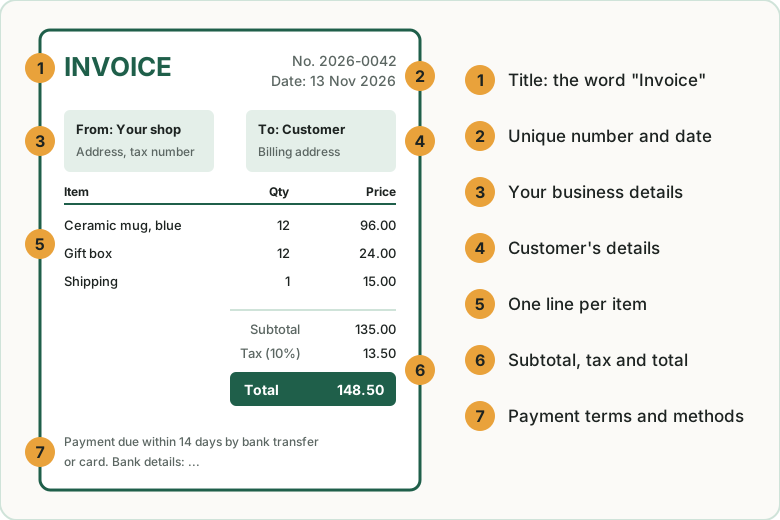
The exact requirements depend on where you are, but most invoices include:
- The word “Invoice” and a unique, sequential invoice number.
- The issue date and, if relevant, the due date.
- Your business details: business name, address and, where applicable, your tax registration number.
- The customer’s details: name and billing address, and their business tax number if required.
- A line for each item: description, quantity, unit price.
- Subtotal, taxes and total, with the tax rate shown.
- Payment terms and methods: how and by when to pay. See payment terms explained.
Keep invoice numbers in one unbroken sequence. Gaps or duplicates are a common red flag during tax checks.
Keep records tidy from day one
Good invoicing is half the job. The other half is being able to find everything later.
- Use one business bank account for all sales and expenses. Mixing personal and business spending is the number one source of bookkeeping pain.
- Match payouts to sales. Payment providers and marketplaces pay out in batches, minus fees. Record the gross sales, the fees and the net payout separately.
- Save every expense receipt as a photo or PDF the day you get it.
- Pick a monthly routine: one hour to check that sales, payouts and expenses all match. Our monthly bookkeeping checklist gives you the steps.
When invoicing software helps
You can create invoices with a word processor template, and some sellers do that for years. Our invoice template gives you an example to copy. Software starts to help when you want to:
- number invoices automatically and never reuse a number;
- add taxes correctly for each customer;
- send invoices by email with an online “pay now” link;
- send automatic payment reminders for overdue invoices;
- connect your bank account so payments are matched to invoices;
- produce simple reports (sales, taxes collected, unpaid invoices) for your accountant.
Kinds of tools to look at
Plans, prices and country availability change often, so check each vendor’s site before you choose.
- Free or low-cost starters. Wave and Zoho Invoice have offered free invoicing for small businesses, with paid add-ons for things like payment processing. They are a good first step if you send a handful of invoices a month.
- Invoicing plus time and client management. FreshBooks focuses on simple invoicing, expenses and payments, with a friendly interface for non-accountants.
- Full accounting. QuickBooks Online covers invoicing, bookkeeping, bank feeds and tax reports in one place. It is more than many tiny shops need, but many accountants use it, which can make working with one easier.
When you compare, look at: which countries and currencies are supported, whether it connects to your store and bank, how many invoices or clients the plan allows, and whether your accountant can log in. Our FreshBooks vs QuickBooks vs Wave comparison lists current prices and limits.
Key takeaways
- Store confirmations and receipts cover most consumer sales; business customers and tax registration usually mean real invoices.
- A good invoice has a unique sequential number, both parties’ details, line items, tax and total.
- One business bank account and a monthly reconciliation habit prevent most bookkeeping problems.
- Start with a free or low-cost invoicing tool, and move to full accounting software when your accountant or your volume asks for it.
Related guides
Best invoicing software for small business: 5 options compared
Three good invoicing tools are free. Zoho Invoice, Wave, Square Invoices, FreshBooks and QuickBooks Online compared on price, limits and payment fees.
FreshBooks vs QuickBooks vs Wave: which is best for a small online business?
Wave has a free plan, FreshBooks starts at $23 a month and QuickBooks Online at $38. Prices, limits and the right choice for a small online business.
Invoice payment terms explained: Net 30, due on receipt and more
What Net 30, due on receipt and 2/10 Net 30 mean, what payment terms to put on an invoice as a small business, and how to get paid on time.